Every conversation with an AI coding assistant starts the same way. Before it can help, it needs to know what your project looks like. So you paste a folder tree.
If you've done this, you know how it goes. You run tree, and your terminal scrolls for a very long time, because it faithfully lists every file inside node_modules. You run it again with an ignore flag, and now you get .next, dist, .DS_Store, three lockfiles and a cache folder. You hand-delete half of it, paste the rest, and hope the model works out which of the 600 remaining files actually matter.
I did this enough times that I stopped and wrote a tool instead. It's called directree, published on npm as contextree, and I shipped it on 11 June 2026.
- Code: ayushcody/directree on GitHub
- Install: contextree on npm
- The launch post: my LinkedIn post about it
The idea: a map, not a dump
A model doesn't need every file. It needs the shape of the project: where the routes are, where the data layer lives, which files are configuration, and which are entry points. That's what a senior engineer looks for in the first thirty seconds of opening a new repository.
So contextree does four things a plain tree doesn't:
- Filters noise automatically, including framework-specific build folders.
- Annotates files with their role, such as
[page],[layout],[db-client]or[config]. - Detects the language and framework, and says so up front.
- Estimates the token cost, so you know what the paste will cost you before you paste it.
Here's real output, run on my DSA Karle repository with contextree --ai --depth 1 (trimmed for length):
<project_structure lang="typescript" framework="nextjs" files="261" est_tokens="693">
dsakarle/
├── app/  [app-router]
│   ├── (app)/
│   │   └── … 2 more
│   ├── layout.tsx  [layout]
│   └── sitemap.ts
├── components/  [ui-components]
├── content/
│   └── curriculum.json  [config]
├── hooks/  [react-hooks]
│   └── useProgress.ts  [hook]
├── lib/  [lib]
│   ├── tracers/
│   │   └── … 26 more
│   └── content-schema.ts  [lib]
├── tests/  [tests]
├── next.config.mjs  [config]
└── package.json  [manifest]
</project_structure>

tokens: ~693  ·  files: 261  ·  ignored: node_modules .git dist build
That folder contains 25,113 files on disk, almost all of them inside node_modules, .next and .git. Contextree's full view keeps the 628 that belong to the project and estimates about 4,750 tokens for all of them. The one-level --ai view above is about 690 tokens, small enough to paste into any chat and still enough for a model to understand the layout.
How it works
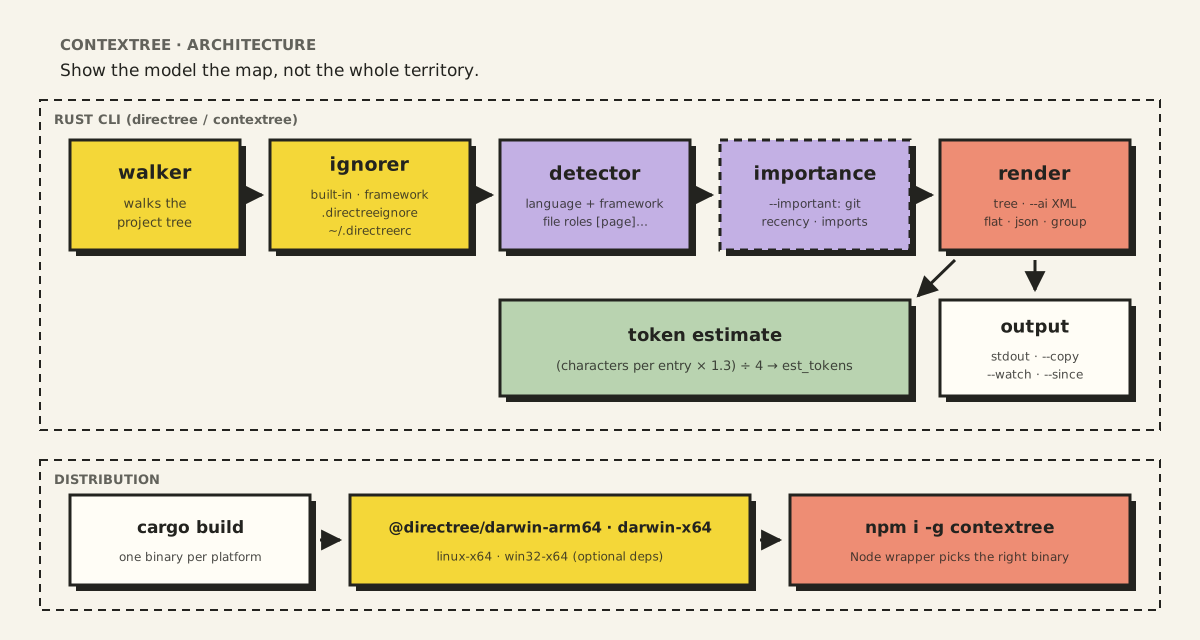
The pipeline has five stages, each in its own Rust module.
1. Walk
The walker reads the directory tree once, respecting the depth limit and any --focus path. Everything after this works on an in-memory tree, which is why the extra views (grouped, flat, JSON) cost almost nothing.
2. Ignore, in layers
Ignoring is where plain tree falls down, so contextree layers four sources of rules:
| Layer | Examples |
|---|---|
| Built-in, always | node_modules, .git, .DS_Store, .idea, .vscode, .cache, coverage, .turbo |
| Framework-aware | Next.js: .next/, out/, next-env.d.ts · Rust: target/ · Python: __pycache__/, .venv/, dist/ · Go: vendor/ |
| Per project | a .directreeignore file, same syntax as .gitignore |
| Per user | ~/.directreerc, for things you never want to see anywhere |
contextree --show-ignore prints every active rule, because a tool that hides files should always be able to tell you what it hid and why.
3. Detect
The detector reads the project's manifest files (package.json, Cargo.toml, pyproject.toml, go.mod) to decide the language and framework. That decision drives two things: which extra ignore rules apply, and how files get classified.
Classification is framework-aware. In a Next.js App Router project, page.tsx is a [page] and layout.tsx is a [layout]. A file under components/ is a [ui-component]. A supabase.ts in lib/ is a [db-client]. These labels are cheap for the tool to compute and save the model a lot of guessing.
4. Score importance (optional)
--important marks the files most worth reading first with a ★. The score combines a few signals:
- Role: entry points (
main,index,app,server) score highest, then route roots (layout,page), then key configuration files (package.json,tsconfig.json,Cargo.toml,docker-compose.yml). - Recency: files changed in git in the last seven days get a boost, because that's usually what you're working on.
- Imports: files that many other files reference are probably core infrastructure.
5. Render and count tokens
The same tree renders six ways: the normal tree, the --ai XML block, a flat path list (the cheapest format in tokens), a grouped view (source, config, tests, assets), JSON, and a stats summary.
The token estimate is deliberately simple:
pub fn estimate_tokens(root: &TreeNode) -> usize {
    fn chars(n: &TreeNode) -> usize {
        n.name.len() + 6 + n.children.iter().map(chars).sum::<usize>()
    }
    ((chars(root) as f64 * 1.3) as usize / 4).max(1)
}
Count the characters in each entry plus about six for the tree drawing, add 30% for overhead, and divide by four (a common rule of thumb for English-like text). It isn't any model's real tokenizer, and it doesn't pretend to be. It's accurate enough to answer the question that matters: "Is this paste going to be 500 tokens or 50,000?"
The XML wrapper is for the model, not for you
The --ai output wraps the tree in a tag:
<project_structure lang="typescript" framework="nextjs" files="261" est_tokens="693">
Models handle clearly delimited context well. The tag tells the model where the structure starts and ends, so it can't blend into your question. The attributes hand it the most important facts (language, framework, size) before it reads a single line of the tree.
Built for how people actually work
A few features exist because I kept wanting them:
| Command | Why |
|---|---|
contextree --ai --copy | Straight to the clipboard, ready to paste |
contextree --since HEAD~1 | Only files changed since a commit, for "review what I just did" |
contextree --focus src/components | Zoom into one area, with a breadcrumb so the model knows where it is |
contextree --only ts,tsx | Only the file types that matter for the question |
contextree --watch --ai | Re-renders on every file save |
contextree init | Writes a .directreeignore suited to the detected framework |
Shipping a Rust binary through npm
I wrote contextree in Rust because it walks large trees and should feel instant. But most of the people who'd use it live in JavaScript projects and expect npm install -g. Distributing a native binary through npm took more care than writing the tool.
The pattern I used (the same one several popular CLIs use) works like this:
- Build one binary per platform: macOS on Apple Silicon and Intel, Linux x64 and Windows x64.
- Publish each binary as its own small npm package (
@directree/darwin-arm64,@directree/linux-x64, and so on). - Publish the main
contextreepackage with those as optional dependencies. npm only installs the one that matches your system. - A tiny Node wrapper finds the right binary for the current OS and CPU and runs it, passing every argument through.
The wrapper also handles the boring failure cases: an unsupported platform gets a clear error instead of a stack trace, and a binary that lost its executable permission gets it back.
The first release taught me one more lesson. Global installs on macOS often fail with EACCES: permission denied because of how npm's global folder is owned. That's not a bug in the tool, but it's the first thing a new user sees, so the README now explains the cause and both fixes before anyone has to ask.
Naming taught me the last lesson: directree was already taken on npm, by a package from 2017. So the npm package is contextree, and it installs both the contextree and directree commands.
What I'd improve next
- A real tokenizer option, for when an estimate isn't enough.
- Smarter collapsing, so 23 near-identical lesson files show as one pattern instead of a count.
- Content summaries, a line per important file describing what's inside, generated locally.
Why this matters more than it looks
Context windows keep getting bigger, and it's tempting to think that means you can stop being careful about what you send. In practice, the opposite is true: more context makes it more important to send the right context. A small, accurate map of the project beats a huge, noisy one, both for cost and for the quality of the answer.
Contextree is a small tool. But it's built on an idea I keep coming back to in everything I build with AI: the model can only be as good as what you show it.
If you try it, I'd love to hear what it gets wrong. The code is on GitHub, and the launch is on LinkedIn.