Error: listen EADDRINUSE: address already in use :::3000
If you write web apps, you have seen this line more often than your own family. The usual fix is muscle memory: find the process ID, kill it, move on. On macOS that's lsof -i :3000, then kill -9 and a number. On Linux it might be ss. On Windows it's netstat, then Task Manager, then a quiet sigh.
The muscle memory works until the day the process on that port isn't your forgotten dev server. It's a database. Or a Docker proxy. Or something owned by root that your system needed. kill -9 doesn't ask.
I wanted a tool that asks. That became killit.
What it does
ki 3000          # free port 3000, safely
ki 3000 8080     # free several ports
ki               # no arguments: pick from a list of everything listening
killit list      # every listening port, with a safety rating for each
killit inspect 3000   # who owns this port, where the binary lives, and the risks
The architecture
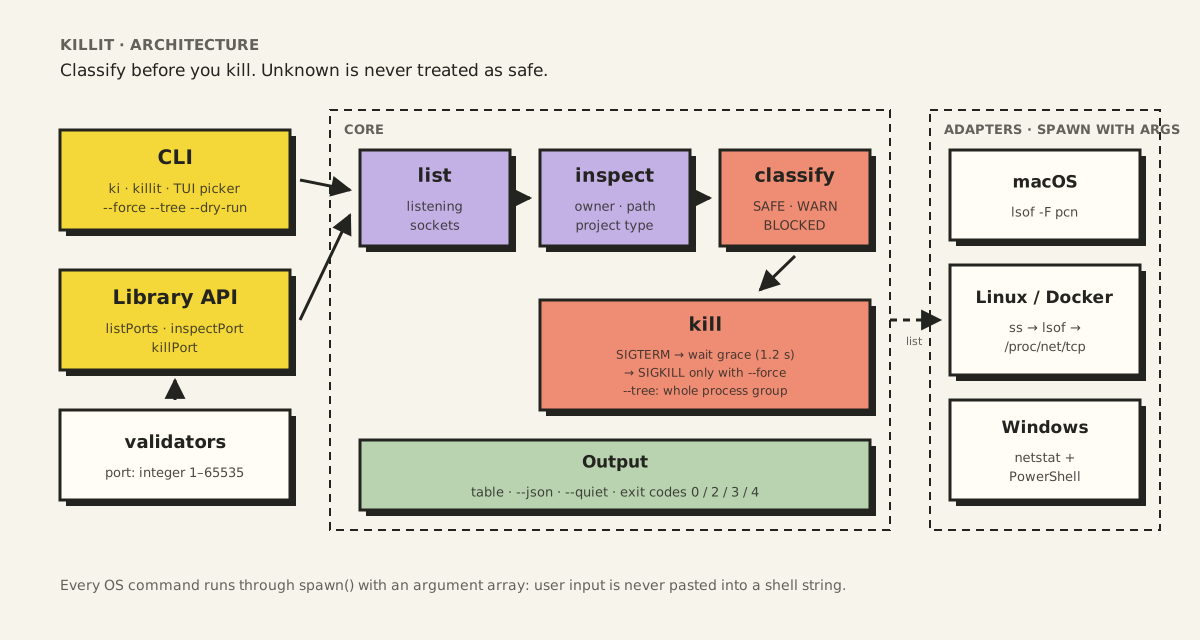
killit is small, but it's organized like a larger tool, because a command that terminates processes deserves clear boundaries.
- Two front doors, one core. The CLI (
kiandkillit) and the library API (listPorts,inspectPort,killPort) call the same functions. There's no "CLI-only" logic that the library could skip, so both get the same safety rules. - A pipeline of four steps.
listfinds listening sockets,inspectadds who owns each one and where its binary lives,classifydecides how dangerous it would be to stop, andkilldoes it (or refuses). - Adapters for each operating system. Only the adapters know about
lsof,ssornetstat. The core works with a plain list of{ port, pid, process, owner, path }records, whichever system produced them. - Validation at the edge. Ports are checked (whole numbers from 1 to 65535) before anything reaches the core.
The core idea: classify before you kill
Every process gets one of three safety levels before anything is terminated:
| Level | What happens | Examples |
|---|---|---|
| SAFE | Terminated right away | Your Node, Python, or Ruby dev server |
| WARN | Refused unless you add --force | Root-owned processes, privileged ports (below 1024), Docker proxy, binaries in system folders |
| BLOCKED | Never terminated | PID 1 (init, systemd, launchd), the Windows System process (PID 4), Linux kernel threads |
Warnings come with reasons and a remediation hint. Port held by the Windows System process? That's usually http.sys, and the hint says to run net stop http instead. A Docker proxy? Stop the container, not the proxy.
The bug that taught me the most
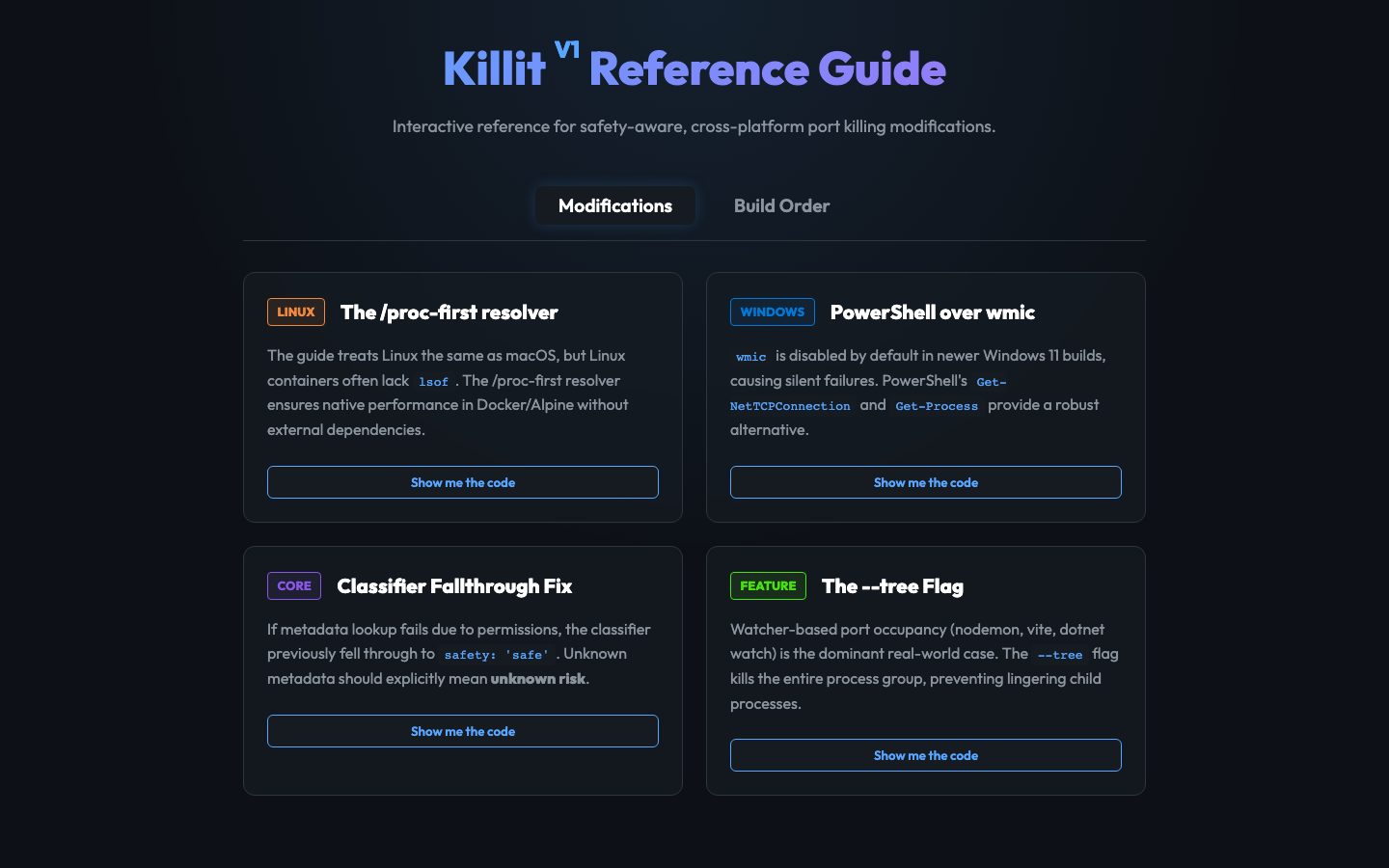
The first version had a quiet flaw. When killit couldn't read a process's metadata, usually because of permissions, the classifier found no warning signs and fell through to SAFE.
Read that again. "I don't know what this is" was being treated as "this is fine."
The fix was one rule, now commented as critical in the source:
// CRITICAL: unknown metadata = unknown risk (NOT safe)
if (!info.executablePath && !info.owner && !info.processName) {
  reasons.push('Metadata unavailable — unknown risk')
  riskReasons.push('unknown_metadata')
}
It's the most important line in the project, and the lesson travels well beyond port killers: when a safety check can't get the data it needs, the answer is "unknown," never "safe."
Graceful first, forceful only when asked
killit never starts with SIGKILL. It sends SIGTERM, which lets a process close files and connections cleanly, then waits (1.2 seconds by default, adjustable with --grace) and checks whether the process has exited.
Only with --force does it escalate to SIGKILL. And --tree terminates the whole process group, which matters more than it sounds: file watchers like nodemon and Vite restart their child process when you kill it, so freeing the port means stopping the parent too.
--dry-run shows exactly what would happen without touching anything. For a tool whose entire job is destruction, a rehearsal mode felt mandatory.
Cross-platform means different tools everywhere
There is no single command that lists listening ports on every OS, so killit layers its detection:
| Platform | Method |
|---|---|
| macOS | lsof |
| Linux | ss, then lsof, then reading /proc/net/tcp directly |
| Docker and Alpine | /proc/net/tcp directly (minimal images often have no lsof) |
| Windows | netstat plus PowerShell (wmic is disabled by default in newer Windows 11 builds) |
Asking for machine-readable output
On macOS, killit runs:
lsof -nP -iTCP -sTCP:LISTEN -F pcn
-nP skips DNS and port-name lookups (faster, and no surprises), and -sTCP:LISTEN keeps only listening sockets. -F pcn switches lsof to its field output mode: one value per line, each prefixed with a letter (p for process ID, c for command name, n for the address). Parsing a format designed for machines is far more reliable than splitting a table designed for humans, whose column widths change with the data.
The last-resort path: reading the kernel's own tables
Minimal Linux containers often have neither ss nor lsof. But the kernel always exposes its socket tables as files, so killit reads them directly:
- Read
/proc/net/tcpand/proc/net/tcp6. Each line is one socket. Addresses and ports are in hexadecimal, and a state of0Ameans listening. Each socket also has an inode number. - Build a map from inode to port.
- Walk
/proc/<pid>/fd/for each process. File descriptors that are sockets appear as symbolic links namedsocket:[<inode>]. A matching inode tells you which process owns the port.
It's more work than calling a tool, but it needs nothing installed, which is exactly the situation it exists for.
The one exception to "no shell"
Every command runs through spawn() with an argument array, never through a shell. There's one documented exception: on Windows, netstat runs with shell: true, because it needs the shell's pipe handling there. Its arguments (-ano -p tcp) are fixed, and no user input ever reaches that command line.
Built for scripts, not just people
A CLI that other tools can't rely on is only half a CLI:
--jsonon every command, for scripts and CI.--quietto suppress output and rely on the exit code.- Exit codes that mean something specific:
| Code | Meaning |
|---|---|
| 0 | Success, or nothing was listening (running it twice is safe) |
| 2 | Refused for safety; add --force |
| 3 | Permission denied; needs sudo or Administrator |
| 4 | Internal error |
It also works as a library:
import { listPorts, inspectPort, killPort } from 'killit'

const [target] = await inspectPort(3000)
const result = await killPort(target, { tree: true })
Testing a tool that kills things
You can't trust a process killer you haven't watched kill something. The test suite has two kinds of tests:
- Unit tests for the parts that are pure logic: the safety classifier, the output parsers, and the input validators. The classifier tests include the bug above: a process with no readable metadata must come back as WARN.
- Integration tests that start real servers on real ports and kill them.
The integration fixture I like most is the stubborn server: a tiny Node process that listens on a port and deliberately ignores SIGTERM.
// test/fixtures/stubborn.ts
process.on('SIGTERM', () => {
  /* intentionally ignored */
})
It proves the escalation path actually works. The test starts the stubborn server, kills it with force: true and a 500 ms grace period, and asserts two things: the result is killed, and the signal that actually did it was SIGKILL. If the escalation logic ever broke, the process would survive SIGTERM and the test would fail. A well-behaved server would never exercise that path, which is why the fixture exists.
Security choices
A tool that runs system commands with user input has one job before all others: don't become an injection vector.
- No shell strings. Every OS command runs through
spawn()with an argument array. User input is never pasted into a shell command, avoiding the class of bug behind CVE-2019-5414 in an older port-killing package. - Validated input. Ports must be integers from 1 to 65535 before any system call happens.
- No install scripts. Installing killit runs nothing on your machine.
- The safety policy is versioned. Any change that lets killit terminate more processes without
--forceis a major version bump.
Try it
The name killit turned out to be taken on npm, so for now install it from source:
git clone https://github.com/ayushcody/killit.git
cd killit
npm install
npm run build
npm link        # puts `killit` and `ki` on your PATH
What I'd tell my past self
The code was the easy part. The decisions were hard: what counts as dangerous, what the default should be, what a refusal message should say so the user knows exactly what to do next. A good CLI is mostly good judgment written down as defaults, plus documentation that says why.
The source and tests are on GitHub.