Type "I can't log in" into a help center with plain keyword search, and you get nothing. The page you need is called "Reset your password," and it never uses the words can't, log, or in.
Semantic search fixes that. It also introduces a new and slightly hilarious failure: ask it what error E1042 means, and it confidently returns the page about error E1024, because to an embedding model, those two strings look like close cousins.
This post explains how semantic search works under the hood, why the best systems combine it with old-fashioned keyword search, and how to tell whether yours is actually finding the right pages. Every code sample runs as written, and the outputs shown are real.
Keyword search: fast, literal, and surprisingly hard to beat
Classic search engines rank documents by the words they share with the query. The standard algorithm, BM25, gives more weight to words that are rare across the collection (like E1042) and less to common ones (like "the" or "how").
Keyword search is excellent at:
- exact identifiers: error codes, product names, version numbers, API names;
- precise phrases: "retention policy," "multi-factor authentication";
- being explainable: you can see exactly which words matched.
It fails whenever the question and the answer use different words for the same idea. Users say "can't log in"; docs say "reset your password." Users say "deleted by accident"; docs say "restore a file."
Semantic search: matching meaning instead of words
Semantic search starts with an embedding model: a neural network that turns a piece of text into a list of numbers, called a vector. Real embedding vectors have hundreds or thousands of dimensions. The useful property is that texts with similar meanings end up with similar vectors, even when they share no words.
To see the idea, imagine an embedding model with only three dimensions, each measuring how much a text is about one topic: account access, billing, and hardware.
| Text | Account access | Billing | Hardware |
|---|---|---|---|
| "Reset your password" | 0.90 | 0.10 | 0.05 |
| "Update your payment method" | 0.15 | 0.95 | 0.05 |
| "Replace the power supply" | 0.05 | 0.10 | 0.98 |
| Query: "I can't log in" | 0.85 | 0.20 | 0.10 |
Real models don't have human-readable dimensions like these. This is a toy, but the math is the same.
Measuring closeness with cosine similarity
To compare two vectors, the standard measure is cosine similarity: the cosine of the angle between them. Vectors pointing the same way score close to 1; unrelated vectors score close to 0.
import math

def cosine(a, b):
    dot = sum(x * y for x, y in zip(a, b))
    norm_a = math.sqrt(sum(x * x for x in a))
    norm_b = math.sqrt(sum(y * y for y in b))
    return dot / (norm_a * norm_b)

# Toy 3-dimensional "embeddings": [account access, billing, hardware]
docs = {
    "Reset your password":           [0.90, 0.10, 0.05],
    "Update your payment method":    [0.15, 0.95, 0.05],
    "Replace the power supply":      [0.05, 0.10, 0.98],
}
query = [0.85, 0.20, 0.10]   # "I can't log in"

for title, vector in sorted(docs.items(), key=lambda d: -cosine(query, d[1])):
    print(f"{cosine(query, vector):.3f}  {title}")
Output:
0.991  Reset your password
0.381  Update your payment method
0.185  Replace the power supply
"I can't log in" and "Reset your password" share no words, but they score 0.991. That's the entire trick.
From one comparison to millions
Comparing the query with every document works for a few thousand passages. For millions, vector databases use approximate nearest neighbor (ANN) indexes, such as HNSW, which build a graph of vectors so a search only visits a small fraction of them. You trade a tiny amount of accuracy for answers in milliseconds.
The full pipeline:
- Chunk each document into passages, ideally one topic per chunk.
- Embed every chunk and store the vector with its text and metadata (source, product version, date).
- Embed the query with the same model. Vectors from different models aren't comparable.
- Retrieve the nearest chunks.
- Rerank the candidates and return the best few, with links to their sources.
Where semantic search goes wrong
Understanding meaning is a strength until the user needs something exact. These are the misses I see most:
| Failure | Example | Why it happens |
|---|---|---|
| Exact identifiers | E1042 returns the page for E1024 | Codes and version numbers look similar as text; the model has no idea one digit matters |
| Negation | "versions that don't support encryption" returns pages about encryption support | Embeddings capture the topic more strongly than the "not" |
| Very short queries | "retention" | Too little text to pin down which meaning the user wants |
| Unfamiliar jargon | A product's internal feature name | The model never saw the term in training, so its vector is a guess |
| Stale chunks | Two versions of the same page | Both match; nothing in the vector says which one is current |
Every one of these is a reason not to rely on vectors alone.
Hybrid search: keep both, then merge
The fix used by most production systems is hybrid search: run a keyword search and a vector search side by side, then merge their ranked lists.
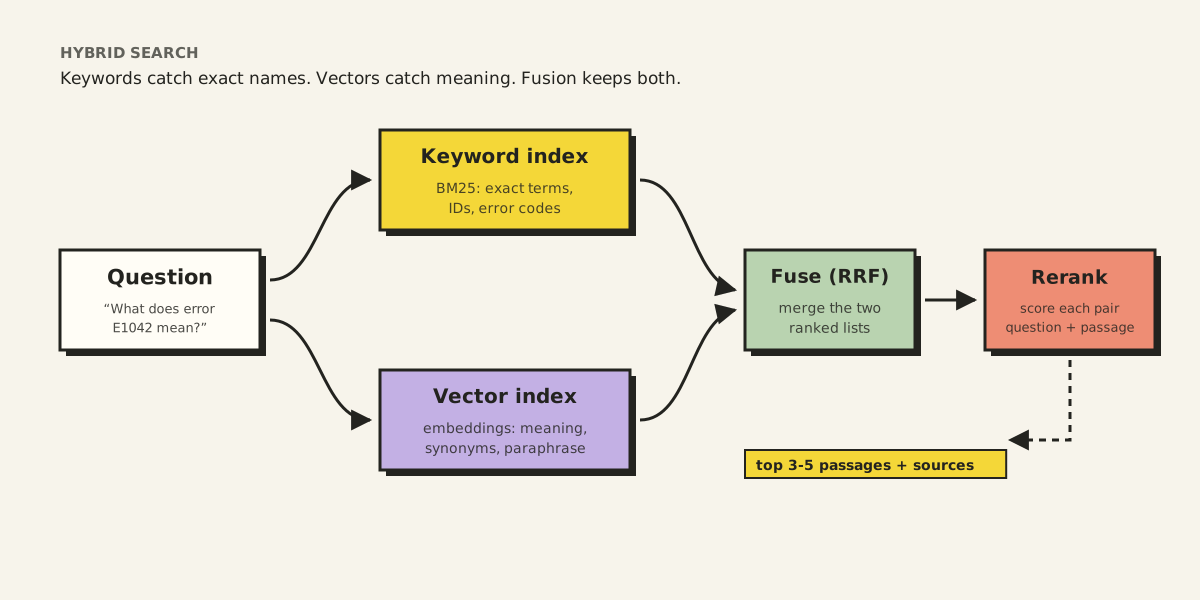
The two scoring systems aren't on the same scale, so you can't just add the scores together. The common approach is reciprocal rank fusion (RRF), which only looks at each document's position in each list:
def rrf(*rankings, k=60):
    scores = {}
    for ranking in rankings:
        for rank, doc in enumerate(ranking, start=1):
            scores[doc] = scores.get(doc, 0) + 1 / (k + rank)
    return sorted(scores, key=scores.get, reverse=True)

keyword  = ["error-E1042", "backup-schedule", "retention-policy"]
semantic = ["retention-policy", "error-E1042", "restore-guide"]

print(rrf(keyword, semantic))
Output:
['error-E1042', 'retention-policy', 'backup-schedule', 'restore-guide']
error-E1042 wins because both lists rank it near the top. A document that only one method finds still makes the list, just lower down. The constant k (60 is the value from the original paper) stops a single first-place finish from dominating.
Reranking: the expensive second look
Retrieval compares a query vector with document vectors that were computed separately, which is fast but shallow. A reranker (usually a cross-encoder) reads the question and each candidate passage together and scores how well the passage answers it. It's far too slow to run on millions of documents, but perfect for reordering the top 20 or 50.
The usual shape: retrieve broadly and cheaply, then rerank narrowly and carefully.
How to tell whether it's working
"The results look good" isn't a measurement. A small labeled test set is.
- Collect 30 to 100 real questions users ask.
- For each one, record the page or passage that answers it.
- Run every question through your search and check where the right answer landed.
The two most useful numbers:
- Recall@k: for what fraction of questions does the correct passage appear in the top k results? If the right passage isn't retrieved, nothing downstream can fix it.
- MRR (mean reciprocal rank): how high the correct answer ranks on average. First place scores 1, second 0.5, third 0.33.
def recall_at_k(results, relevant, k=5):
    hits = sum(1 for question, expected in relevant.items()
               if expected in results[question][:k])
    return hits / len(relevant)

results = {
    "How long are backups kept?":   ["retention-policy", "backup-schedule"],
    "What does error E1042 mean?":  ["backup-schedule", "restore-guide"],
    "How do I restore one file?":   ["restore-guide", "retention-policy"],
}
relevant = {
    "How long are backups kept?":   "retention-policy",
    "What does error E1042 mean?":  "error-E1042",
    "How do I restore one file?":   "restore-guide",
}
print(f"recall@5 = {recall_at_k(results, relevant):.2f}")
Output:
recall@5 = 0.67
Two out of three questions found their answer. The miss is the error-code question, exactly the case where vector-only search struggles. That's a strong hint to add keyword search, or to check whether a page for E1042 exists at all.
That last possibility matters more than it sounds. Some misses aren't search problems; they're missing documentation. A test set doubles as a list of content gaps.
Writing content that search can find
Search quality is half retrieval engineering and half writing. A few habits make every search method work better:
- Put identifiers in headings and text. If a page explains error
E1042, the exact string should appear on it, ideally in the heading. - One topic per section, with a specific heading. "Restore a single file" retrieves well. "Overview" retrieves everything and nothing.
- Use the words users use. Mention "can't sign in" on the password reset page, not only "authentication failure."
- Keep one name for one thing. Synonyms within your docs split one topic into several weaker matches.
- Label versions. "Applies to version 7.1 and later" lets search, and readers, discard the outdated page.
I wrote more about structuring documents for retrieval in my post on why RAG keeps coming back.
The short version
- Keyword search (BM25) matches words. It's precise, fast, and great at exact identifiers.
- Semantic search matches meaning using embeddings and cosine similarity. It's great at paraphrase and terrible at error codes.
- Hybrid search runs both and merges them with reciprocal rank fusion. It's the sensible default.
- Reranking gives the top candidates a slower, smarter second look.
- Measure with recall@k and MRR on real questions, and treat every miss as either a search bug or a documentation gap.
Search that understands what people mean is wonderful. Search that also respects exactly what they typed is the kind people trust.