Here is how I learned two pointers the first time. I read the definition. I read the code. I nodded. I closed the tab. Two days later, someone asked me to explain it and I produced a sentence with the confidence of someone describing a movie he only saw the poster of.
The problem wasn't the explanation. It was that I never watched the algorithm make a decision. Every DSA resource I used showed the final code, which is the one moment where all the interesting thinking has already happened.
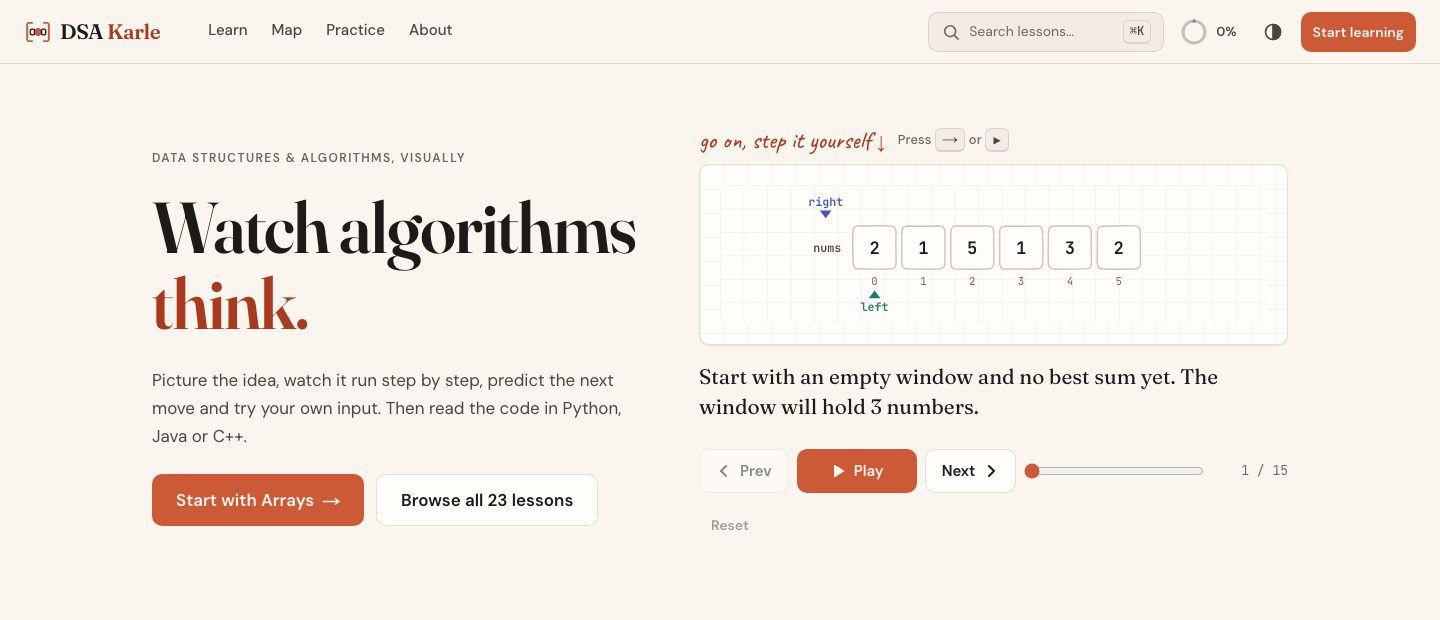
So I started building DSA Karle ("karle" being Hindi for "just do it already"). The goal is simple: you should see an algorithm think before you read a single line of its code.
Start with a question, not a definition
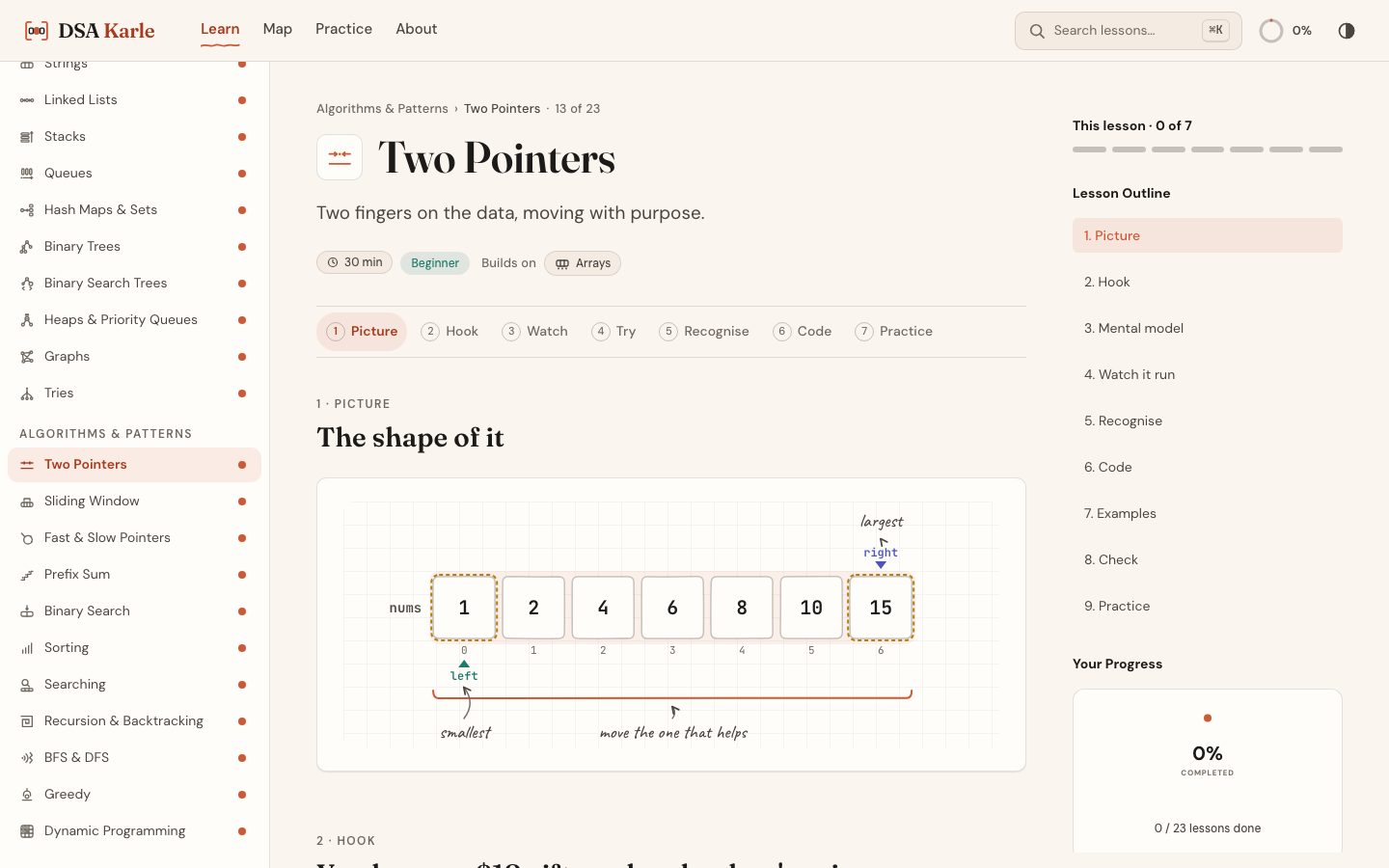
Every lesson opens with a small, concrete problem instead of a definition. This is the hook for two pointers, straight from the lesson file:
You have an $18 gift card and a shop's price list, sorted from cheapest to priciest: 1, 2, 4, 6, 8, 10, 15. Which two items cost exactly $18 together, without trying every pair?
Then it nudges you. The cheapest and the priciest together cost 16, which isn't enough. What does that tell you about the 1?
It tells you the 1 can't be in any answer. One comparison just eliminated an item and all of its pairs. That's the whole algorithm. You discovered it before the lesson named it.
One lesson, seven moves
Every lesson follows the same sequence, so you always know where you are:
- Picture: the shape of the idea, drawn.
- Hook: a real problem that makes you want the idea.
- Watch: the algorithm runs step by step, with pointers moving and variables updating.
- Try: change the input and predict the next move.
- Recognise: which problems call for this pattern, and which don't.
- Code: the same logic in Python, Java, or C++, with each line linked to its step.
- Practice: hand-picked problems, each with a one-line insight.
Consistency here is a feature, not laziness. When the structure never changes, your attention goes to the idea instead of to the page.
The architecture
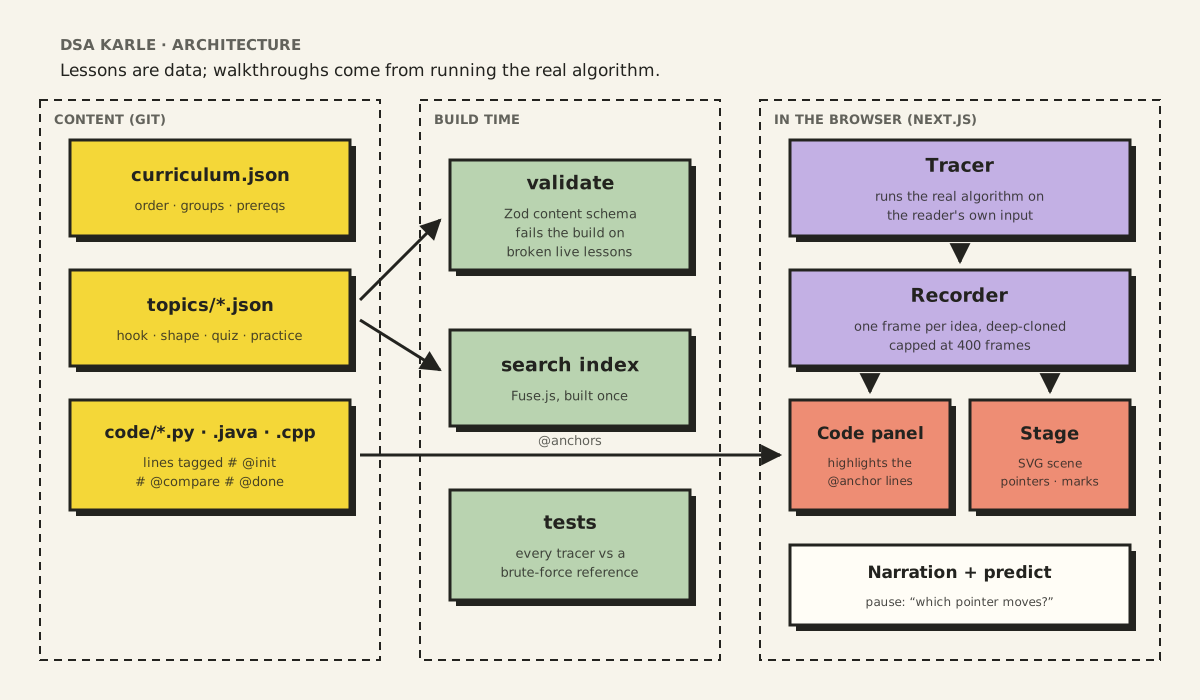
DSA Karle has three layers, and the split between them is the whole design.
Layer 1: lessons are data, not pages
A lesson is not a hand-built React page. It's a JSON document in content/topics/, and one set of components renders every lesson.
The static picture at the top of the two pointers lesson, for example, comes from this:
{
  "kind": "array",
  "label": "nums",
  "cells": [1, 2, 4, 6, 8, 10, 15],
  "pointers": [
    { "name": "left", "index": 0, "role": "ptrA" },
    { "name": "right", "index": 6, "role": "ptrB" }
  ],
  "marks": [
    { "index": 0, "role": "compare" },
    { "index": 6, "role": "compare" }
  ]
}
The same file holds the hook question, the glossary, the "use it when / not when" guidance, a five-question recognition quiz, worked examples and practice problems. Writing a new lesson is mostly writing.
Layer 2: walkthroughs come from running the real algorithm
The animated walkthrough is the part I'm proudest of, and it is not hand-written.
Hand-writing steps ("frame 7: left moves to index 2") has two problems. It's tedious, and it can be wrong in ways nobody notices: a skipped step, an off-by-one pointer. Worse, it only works for the one example you wrote down. The moment a student types their own input, there are no steps.
So every algorithm has a tracer: a TypeScript implementation of the real algorithm that records a frame each time something worth seeing happens.
// From lib/tracers/two-pointers/pair-sum.ts (trimmed)
while (left < right && !rec.capped) {
  const a = nums[left]
  const b = nums[right]
  total = a + b
  const equal = total === target

  emit('compare', `${sumText(a, b, total)}. Compare it with the target ${target}.`, {
    marks: [
      { index: left, role: 'compare' },
      { index: right, role: 'compare' },
    ],
    predict: equal ? undefined : whichPointerPredict(total, target, a, b),
  })

  if (equal) {
    emit('found', `That equals the target ${target}: ${a} and ${b} are the pair.`)
    break
  }
  if (total < target) left++   // then emit('move-left', …)
  else right--                 // then emit('move-right', …)
}
Each call to emit builds a frame from the current state. A frame holds the array scene with both pointers, marks for the cells being compared or discarded, and the variables (left, right, total). It also holds a sentence of narration and at, the name of the step.
The recorder deep-clones every frame when it's recorded, so the tracer can keep changing its working arrays without rewriting history. It also stops at 400 frames, so a student who types a huge input gets a capped walkthrough instead of a frozen tab.
Because the walkthrough comes from running the algorithm, the student's own input works. Type a different array and target, and you get a correct, complete walkthrough for that input.
Layer 3: the code knows which step it's on
Each lesson shows the algorithm in Python, Java and C++, and the line that matches the current step lights up as you step through. That link comes from a tiny convention in the code files: a trailing comment ending in @ and an anchor name.
def pair_sum(nums, target):
    left = 0                                # @init
    right = len(nums) - 1                   # @init
    while left < right:
        total = nums[left] + nums[right]    # @compare
        if total == target:                 # @found
            return [left + 1, right + 1]    # @done
        if total < target:                  # @move-left
            left += 1                       # @move-left
        else:
            right -= 1                      # @move-right
    return [-1, -1]                         # @done
When the tracer emits a frame at 'compare', every language highlights its own @compare line. The parser only counts anchors inside real comments, so a string like "a@b" or Java's @Override annotation is never mistaken for one.
The result is that one tracer drives three languages, and adding a fourth language means writing one more annotated file, not touching the engine.
Predict, then watch
Frames can carry a predict question. Before the walkthrough shows the next move, it pauses and asks: the sum is 16 and the target is 18; which pointer moves? You commit to an answer, then watch what actually happens.
This is the most important teaching feature in the product, and it costs almost nothing in the engine: the tracer already knows the answer, because it's about to do it.
How it stays correct
Content that teaches has to be right. Three checks run before anything ships:
- Content validation.
npm run validatechecks the curriculum, every topic file and every code file against a Zod schema. A broken live lesson fails the build; a draft lesson only warns. - Reference tests. Every tracer comes with a deliberately boring brute-force
referenceimplementation, and the test suite runs both on many inputs and compares results. If a tracer's clever version disagrees with the obvious version, the test fails. - A build-time search index. A script indexes every lesson with Fuse.js during the build, so search is instant and validated content is the only content that can be found.
The reference tests caught exactly the kind of bug a student would have trusted: when several pairs add up to the target, which one should the walkthrough find? The tracer and the reference now agree on purpose (the outermost pair), and the lesson text says so.
Showing how ideas connect
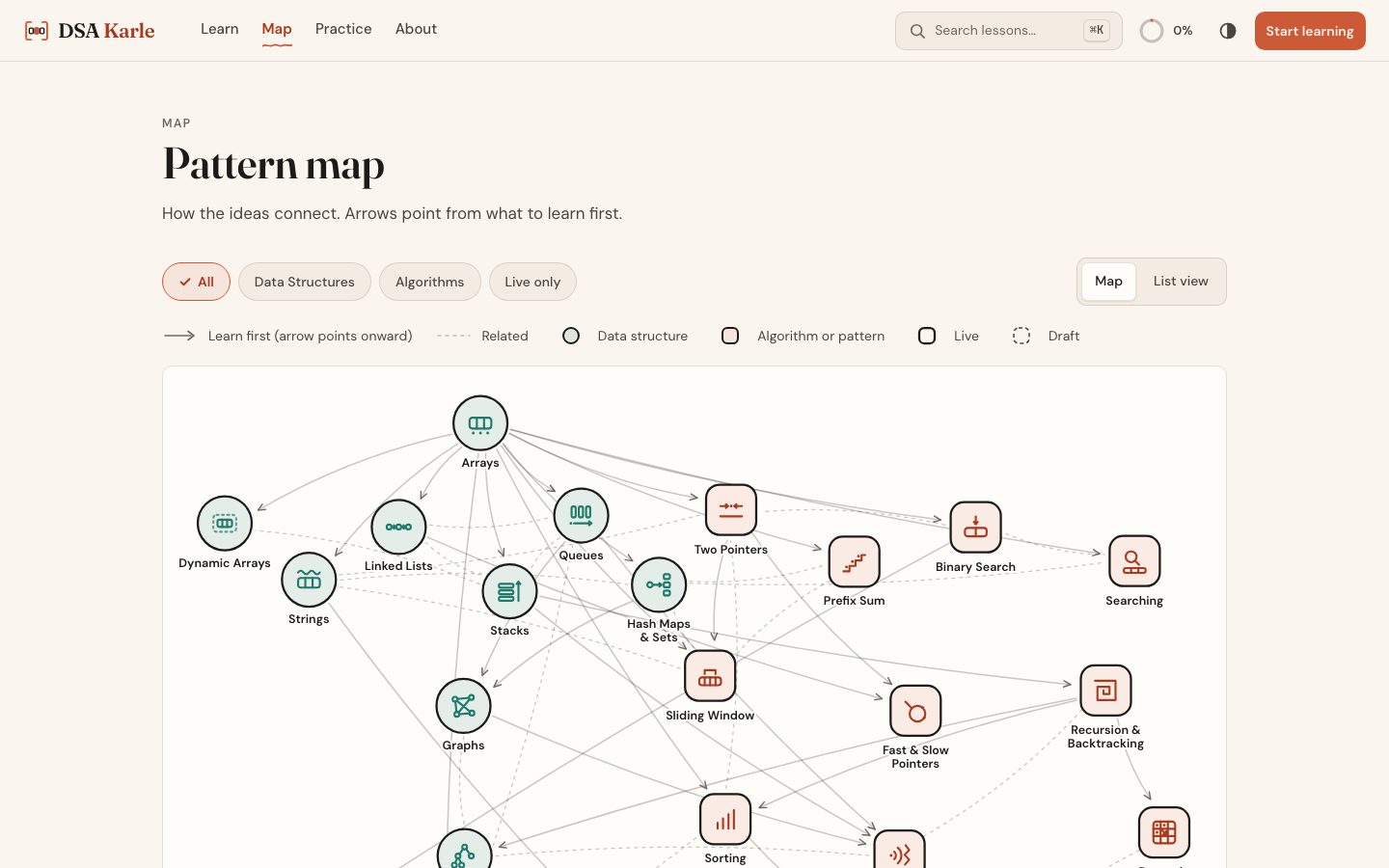
The part I'm proudest of is the pattern map. Arrows point from what to learn first to what it unlocks. If you're stuck on sliding window, the map shows you it builds on arrays and two pointers, and that's usually where the gap is.
What building it taught me about explaining things
DSA Karle is a coding project, but most of the hard work was writing. Every lesson forced the same questions:
- What does the reader already know at this exact point?
- What's the smallest example that still shows the idea?
- Which word will confuse a beginner, and should it be defined right here?
- What is the one sentence they should remember?
For two pointers, that sentence is: sorted order makes every move safe. A sum that's too small can only be fixed by a bigger left number. A sum that's too big, only by a smaller right one.
Code is the last step of understanding, not the first. DSA Karle is my attempt to build the steps before it.
The project is open source on GitHub.